
Introduction: Why a Subdomain Approach?
When hosting workflow automation tools like n8n alongside an existing production website (such as a WordPress site running on a Debian server managed via the KeyHelp control panel), architecture matters.
Initially, the goal was to host n8n under a subpath (e.g., [raymendis.com/n8n](https://raymendis.com/n8n)). However, this approach quickly revealed a major architectural limitation: n8n’s internal Single Page Application (SPA) router and asset-loading expectations are hardcoded around the root domain. When forced into a subpath, asset mapping breaks, internal routing fails, and frontend scripts fail to load correctly because they look for resources at the root level (/assets/...) rather than the subpath level (/n8n/assets/...).
To eliminate internal routing conflicts, protect the main WordPress site’s security and SSL protocols, and maintain a pristine separation of concerns, the deployment strategy was shifted to a dedicated subdomain: n8n.raymendis.com. This allows n8n to run natively at its root (/) behind a clean Apache reverse proxy, while keeping WordPress entirely untouched and functioning normally.
Step 1: Server Prerequisites & Environment Setup
Before installing n8n, the server environment must be properly prepared. The target system is a Debian Linux server running:
- KeyHelp as the server control panel.
- Apache as the web server.
- PHP-FPM for handling website application execution.
Because n8n requires a modern Node.js runtime environment, managing Node directly through system package managers can often result in outdated versions. Therefore, Node Version Manager (NVM) is utilized to install and manage a stable, modern Node.js release (Node v20.20.2).
The Installation Path
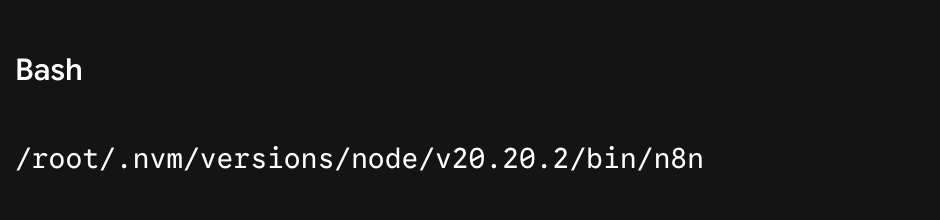
n8n is installed globally via NVM, placing its binary at:

Step 2: Configuring n8n as a Systemd Service
To ensure n8n runs continuously in the background, starts automatically on system reboots, and recovers gracefully from crashes, it must be configured as a systemd service.
A dedicated service file (/etc/systemd/system/n8n.service) was created to launch n8n on its default local port 5678 while binding it securely to the local loopback interface (127.0.0.1), ensuring it is never directly exposed to the public internet without passing through the Apache web server and SSL layer first.
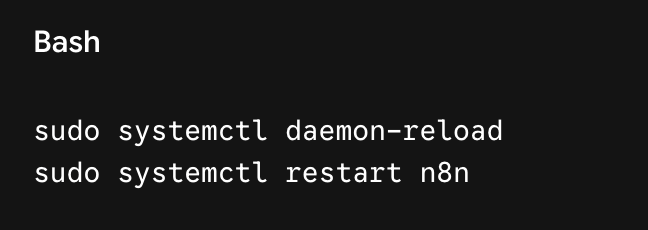
Whenever the n8n service configuration file is updated on disk, systemd requires a daemon reload before changes take effect:

Step 3: Domain and DNS Configuration at Spaceship
To route traffic to the new dedicated environment, a DNS A-record must point the subdomain to the server’s public IP address (217.160.100.103).
- Log in to the Spaceship domain registrar dashboard.
- Navigate to the DNS settings for
raymendis.com. - Create a new A-Record:
- Host:
n8n(Spaceship automatically maps this toxxx.raymendis.com). - Type:
A - Value:
xxx.xxx.100.103(matching the server’s primary IP). - TTL:
30 min
- Host:
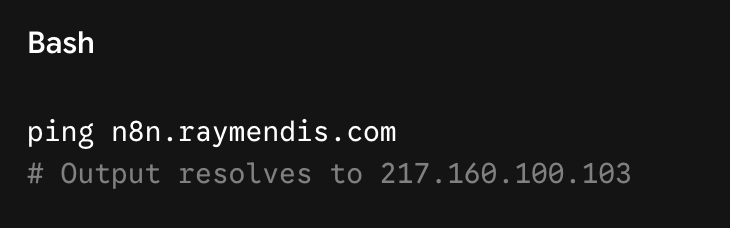
Once propagated, a network ping confirms the DNS mapping resolves correctly:

Step 4: KeyHelp Subdomain Setup & Apache Reverse Proxy Configuration
With KeyHelp managing the virtual hosts, a dedicated subdomain container for n8n.raymendis.com was established. Because n8n runs locally on port 5678, Apache acts as a reverse proxy, securely intercepting incoming HTTPS traffic on n8n.raymendis.com and forwarding it to the local n8n backend, while handling SSL termination and WebSocket connections for the real-time n8n editor interface.
Cleaning the Main Domain
To protect the primary WordPress installation on raymendis.com, any experimental subpath proxy rules (/n8n) were completely purged from the main domain’s Apache settings. This restored the main website to a clean, unproxied state.
Configuring the Subdomain Apache Directives
In the KeyHelp Apache settings for n8n.raymendis.com, the following production-grade reverse proxy configuration was applied under Directives for HTTPS:

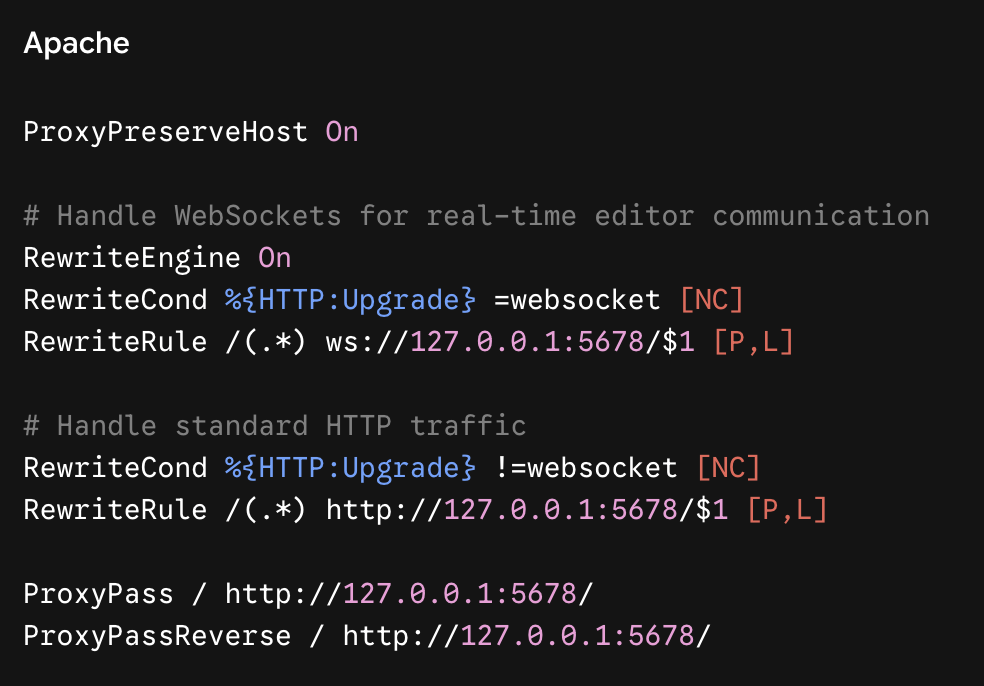
Verifying and Applying Apache Changes
After saving the directives in KeyHelp, the Apache configuration syntax is tested to ensure zero errors:
sudo apache2ctl configtest
Upon receiving Syntax OK, Apache is restarted to apply the changes live:
sudo systemctl restart apache2
Conclusion & Verification
With the DNS fully propagated, systemd running n8n smoothly on port 5678, and Apache correctly proxying traffic through xxx.raymendis.com, the installation is complete.
Visiting [https://xxx.raymendis.com](https://xxx.raymendis.com) in an incognito browser window loads the native n8n login interface securely, fully integrated into the Debian server alongside WordPress and KeyHelp without compromise.